AlarmCrew is an iPhone and iPad alarm app for sharing wake-up status in a Crew. Share an eight-character invite code to join the same Crew. Following friends and joining a Crew are separate actions.
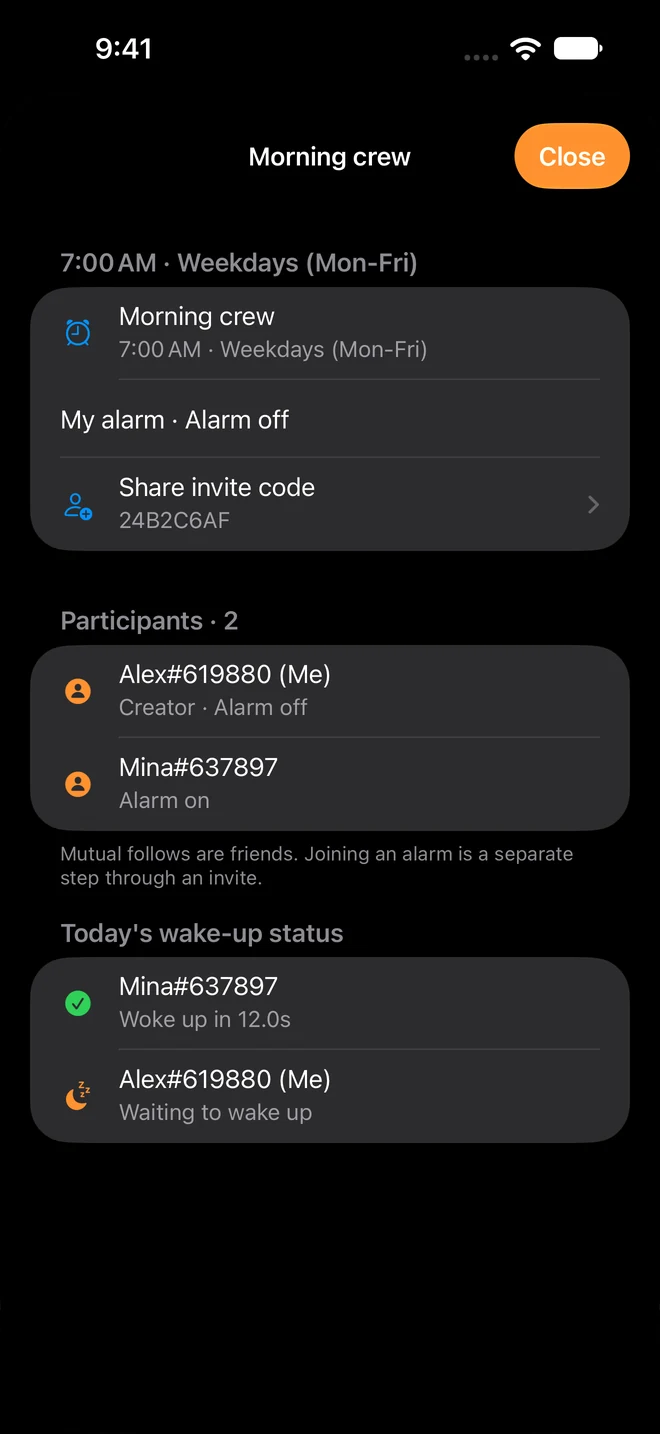
For the host: share your code
- Open the detail screen of the Crew you want to share.
- Find its eight-character invite code in the invite-sharing row.
- Tap that row to copy or share the code with the people you want to invite.
If the code is still syncing, check your internet connection and wait for the screen's sync status to finish before sharing it.
For the invitee: join the Crew
- Open AlarmCrew on an iPhone or iPad running iOS 26.0 or later and sign in.
- Open the Crew joining feature from the alarm list and enter the eight-character code you received.
- After joining, open the Crew detail screen to check your own alarm status and the participant list.
If the code cannot be found, confirm it with the sender. If a network error appears, check your connection and try again.
How wake-up status is shared
Dismissing an alarm sends your wake-up completion to the Crew. Crew members can see completed and waiting states and reaction times. Signing in and syncing Crew status require internet access.
Scheduled alarms run on the device, but cannot ring if it is powered off. Check alarm permissions, volume, battery settings, and your own alarm state. Signing out removes scheduled alarms on that device. Alarms use each device's local time.
Does following a friend join their Crew?
Mutual following connects you as friends, but does not automatically join a Crew or share alarms. Enter the invite code for the particular Crew you want to join. You can also use personal alarms on your own.
Availability and privacy
The iOS app is available on the App Store. Android is preparing for launch, with no public download or confirmed release date. The app includes ads. See the privacy policy (Korean) for account, wake-up, advertising, and diagnostic data details.
If joining or syncing still fails, contact support (Korean) with your device, OS version, and error message. Share your code directly with intended participants rather than posting it publicly.